Recover a dead FRM3 footwell module.
Upload the raw 32 KB D-Flash dump you read with your programmer (VVDI Prog, Xprog, CG Pro, Orange 5, HexTag…). This tool rebuilds the 4 KB emulated EEPROM from it — write that back and your BMW/Mini E-series FRM3 comes back to life.
Free to use — conversion runs in your browser, no sign-up needed.Step 1 — Convert
D-Flash → EEPROM converter
EEPROM preview — first 64 bytes
Step 2 — Full repair
Workshop procedure (VVDI Prog example)
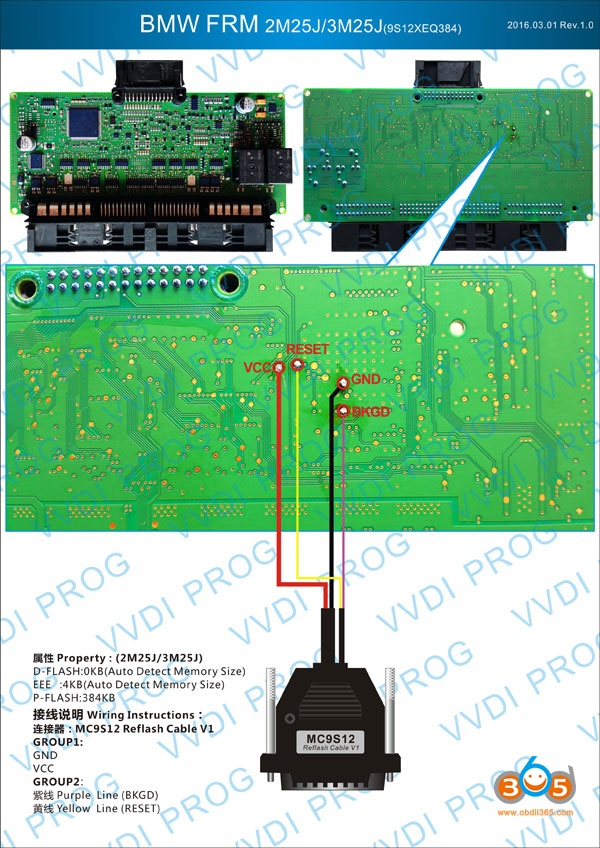
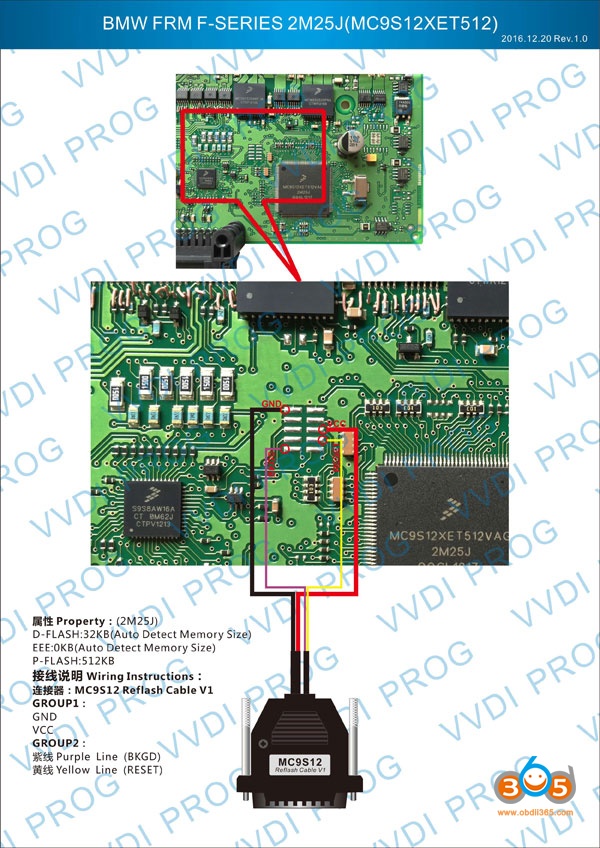
FRM-F-SERIES-XET512 instead of the E-series option.
Click the image to enlarge.
Read the D-Flash from the FRM3
Remove the footwell module (driver-side footwell), open the case and connect your programmer to the BDM pads. In VVDI Prog select MCU → Motorola MC9S12 → 9S12XEQ384 unsecured and read the D-Flash.
If prompted “Partition information error”, set the partition manually: EEE: 0 sectors · DFlash: 128 sectors (32K). Save the 32 KB dump — that is the file you convert above.
Convert D-Flash → EEPROM
Drop the dump into the converter above. It replays the EEPROM-emulation command chain stored in the D-Flash and rebuilds the original 4 KB EEPROM image, including your VIN and module identity.
Write partition + EEPROM back
In VVDI Prog select Type 8-Others → BMW → FRM E-series XEQ384 and run Write Partition with:
| Area | Sectors | Size |
|---|---|---|
| EEPROM (EEE) | 16 sectors | 4 K |
| D-Flash | 0 sectors | — |
.bin and use Write EEPROM to program it.Reinstall & finish on the car
Reset the FRM, refit the module, then clear the fault memory (ISTA / Autel / Launch / VVDI BMW). Reset short-circuit counters if any lighting outputs were locked out, and re-code the FRM if the car asks for it (NCS Expert / WinKFP / CGDI BMW).